Professional

Tax Rules, Rates & Calculations for All 50 States

SOC 2, Masked SSNs, 2FA, SSL Encryption

$3.99 per Paystub, Up to 20 Paystubs at a Time
Tax Supported
Verified
Per Paystub
Paystubs at Once
Happy Customers
Guaranteed
Accuracy Counts
Never worry about state taxes again.
123 Paystubs provides accurate withholding rules, tax rates, and W-4
calculations across all 50 states.
50
States Covered
41
States with Income Tax
9
No-Income-Tax States
2026
Tax Tables Updated
Enterprise Security

Your sensitive personal, payroll, and business information is protected with security measures designed to keep your data safe.

Your personal information is kept confidential and is not sold or rented for promotional or marketing purposes.

Protect your account with two-factor authentication and maintain control over your personal information and account data.
“Best price I’ve seen online. Love you guys!”
Marsha Winston
Affordable
You're first paystub is on us. Try out our tool for free.
Only pay when you generate a paystub ($3.99 each)
Every feature available on every paystub
“Love how easy it is.”
Vickie Cormier
Professional
“Templates are great. Love how simple it is to work.”
Paul Ryder
3 Simple Steps
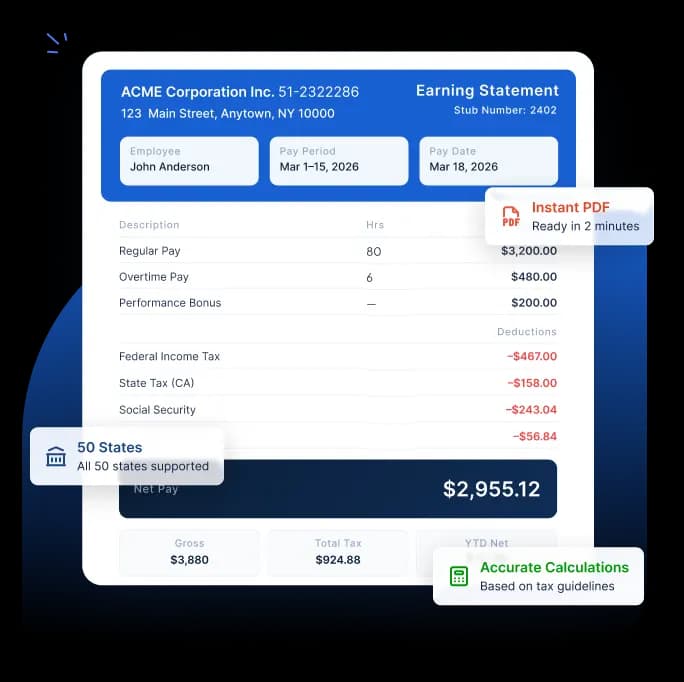
Fill in the basic information about company, employee, earnings, and pay schedule.
Federal, state, Social Security, and Medicare taxes are calculated automatically.
Save, print, or email a professionally
formatted PDF.
“Very simple and accurate.”
Patricia Johnson
Business Paystubs
Whether you’re an employer, a contractor, or an accounting professional, 123 Paystubs is for you.
Generate paystubs for your entire team every pay period with no expensive payroll software needed. Perfect for businesses with
1–50 employees.
Document your 1099 income with clean, lender-ready paystubs. Built for
gig workers, freelancers, and
sole proprietors.
Create accurate, professional paystubs for your clients quickly and easily with automatic tax calculations, customizable templates, and secure online access..
“Very easy to use and time-saving.”
Mark Roberts
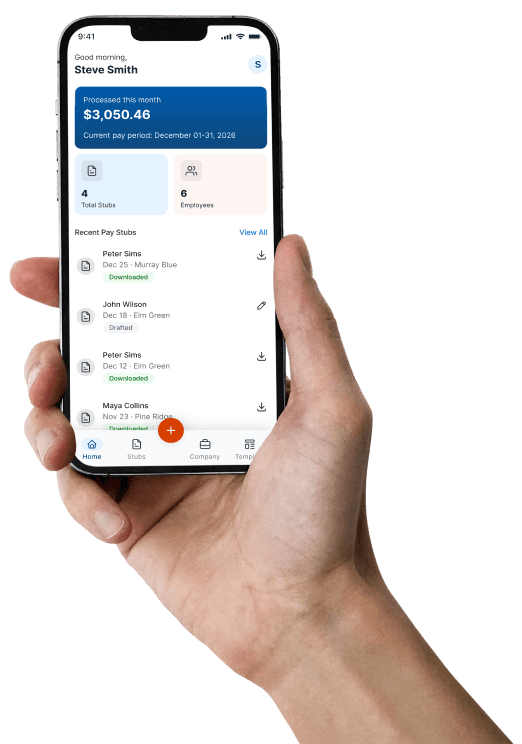
The full power of 123 Paystubs on mobile. Create, preview, and download professional paystubs right from
your phone.

Every feature (tax calculations, 30 templates, custom logo, deductions, and more) works the same on mobile as web.

Download your paystub as an IRS-compliant PDF. Send it by email without ever leaving the app.

Every stub and employee profile stays in sync between mobile and web. Pick up exactly where you left off.









FAQ
A paystub, also known as a paycheck stub, is a document that an employee receives along with their paycheck. It summarizes the employee's gross pay, net pay, taxes, and any relevant deductions.
Employees need paystubs to have a clear understanding of their income, the tax amounts withheld, and as proof that they were paid correctly by their employer or payer.
Employees, employers, independent contractors, freelancers, gig workers and self-employed individuals may all need paystubs for payroll recordkeeping and income documentation. Paystubs are commonly used for tax filing, employment verification, loan applications, and financial reporting.
Paystubs help employees, employers, and independent contractors maintain accurate payroll and income records. They also provide transparency into wages, taxes, deductions, and year-to-date earnings.
With advanced features and automated calculations, Paystub Maker helps simplify payroll documentation and income tracking.
Paycheck stubs are important for:
Many financial institutions and government agencies request recent paystubs as supporting income documentation.
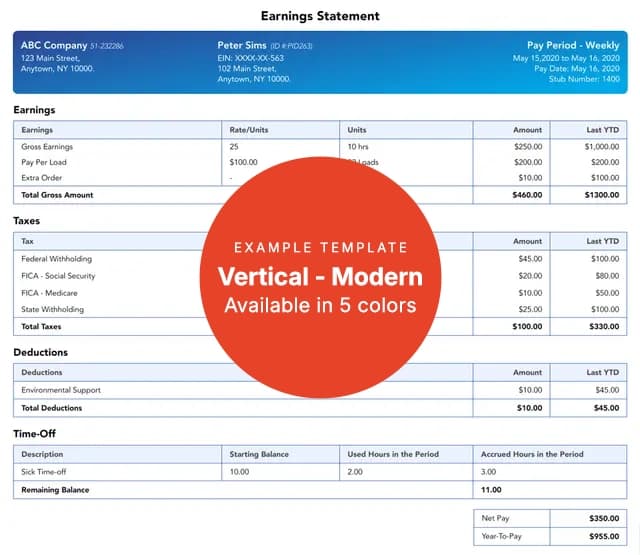
A paystub typically contains both employer and employee payroll information for a specific pay period. The exact details may vary depending on state requirements and employee tax setup.
Common information included on a paystub:
If you need to create a paystub for your employees or contractors, you can use our check stub maker to do it quickly and easily.
Yes. Paystubs generated with 123 Paystubs are created based on the information you provide and include required payroll details such as gross pay, deductions, taxes, and net pay. Our system automatically calculates federal, state, Social Security, and Medicare taxes using current tax rates and withholding rules. Users are responsible for entering accurate payroll information.
Yes. Paystubs created with 123 Paystubs are commonly used as proof of income for apartment rentals, mortgage applications, loans, and employment verification. Each paystub includes important payroll details such as earnings, taxes, deductions, and net pay. Acceptance requirements may vary depending on the lender, agency, or institution reviewing the documents.
Yes. Our paystub generator automatically calculates federal income tax, state income tax, Social Security, Medicare, and other payroll deductions based on the latest tax tables and Form W-4 withholding information.
Most users can create, preview, and download a professional paystub within minutes. Simply enter your payroll details, review the calculations, and download the PDF instantly.
Your employees will receive an email with their paystubs as soon as you place the order. Make sure that you have entered their email address correctly. If your employees haven't received the paystub, please ask them to check their spam or promotions folder and ask them to add support@123PayStubs.com to their contact list to receive their paystub directly in their inbox in the future.
You can make unlimited corrections prior to completing your order. If you have completed your order and then find an error on your paystub, please contact our support team for further assistance. They will help you correct the mistakes on the completed order.
Yes. 123 Paystubs offers multiple professional paystub templates that can be customized with your company logo, earnings, deductions, and payroll details.
Yes. You can create, preview, and download paystubs directly from your mobile phone using the 123 Paystubs mobile-friendly website and the official 123 Paystubs mobile app.
The app is available on both the Google Play Store (Android) and the Apple App Store (iOS), so you can install it on your smartphone or tablet. With the app, you can:
Everything works securely and quickly, so you can create and send paystubs anytime, even when you're on the go.
Yes. Paystubs created with 123 Paystubs are commonly used as proof of income for apartment rentals, mortgage applications, loans, and employment verification. Each paystub includes important payroll details such as earnings, taxes, deductions, and net pay. Acceptance requirements may vary depending on the lender, agency, or institution reviewing the documents.
Yes. Protecting your information is a top priority at 123 Paystubs. The platform uses secure SSL encryption and protected servers to help keep your personal and payroll information safe during the paystub creation process.
You can securely enter your details, generate paystubs online, and download them with confidence using 123 Paystubs.
Year-to-date (YTD) is important for both employers and employees. Employers use YTD to know the amount spent on payroll, whereas employees use YTD to determine the taxes to be reported on their individual income tax returns. 123 Paystubs accurately calculates the year-to-date (YTD) values for you and simplifies the process.
Yes. Our paystub generator automatically calculates the required taxes and YTD values based on current tax laws and the withholding information you enter on your paystub.